
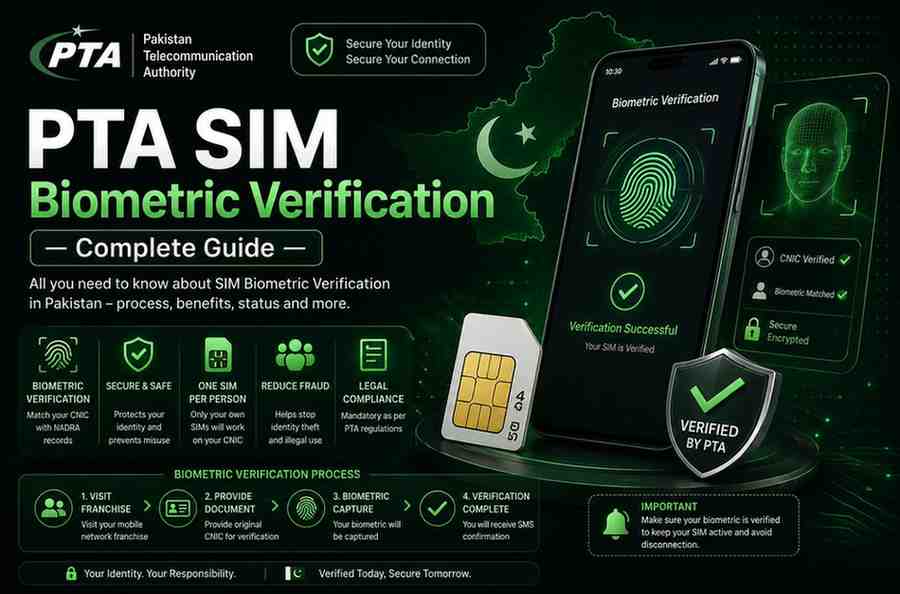
PTA SIM Biometric Verification — Complete Guide 2026
Biometric verification is the absolute cornerstone of Pakistan’s entire SIM registration framework. Mandated and strictly enforced by the Pakistan Telecommunication Authority, every single mobile SIM card issued in the country must be biometrically verified against the purchaser’s unique thumb impression through NADRA’s secure national identity database. This comprehensive guide explains everything you need to know about PTA’s mandatory biometric SIM verification system — how to check your current verification status, complete the re-verification process if required, understand what happens if your SIM remains unverified, and navigate the system across all major Pakistani operators. For related SIM verification topics, you can also explore our guides on Zong SIM verification, Ufone SIM verification, and our main SIM verification resource center.
Table of Contents
- What is PTA Biometric SIM Verification?
- Why Biometric Verification is Mandatory in Pakistan
- How to Check Your SIM Biometric Verification Status
- Operator-Specific Biometric Check Methods
- How to Re-Verify Your SIM Biometrically
- What Happens If You Don’t Complete Biometric Verification
- Understanding the Biometric Verification System (BVS)
- Common Biometric Verification Problems & Solutions
- Frequently Asked Questions
What is PTA Biometric SIM Verification?
PTA Biometric SIM Verification is the mandatory process through which every mobile SIM card issued in Pakistan is digitally linked to the unique biometric data — specifically thumb impression fingerprints — of the individual purchasing and registering the SIM. This verification is performed in real-time against NADRA’s national biometric database, which contains the fingerprint records of every Pakistani citizen who holds a Computerized National Identity Card. The system, officially known as the Biometric Verification System, was fully implemented nationwide following PTA’s directives to eliminate anonymous SIM ownership, curb terrorist activities conducted through unregistered mobile connections, and prevent identity fraud.
When you purchase a new SIM card from any mobile operator in Pakistan — whether Jazz, Zong, Ufone, or Telenor — the franchise representative or authorized retailer is legally required to scan your thumb impression using a biometric device connected to NADRA’s central database. This scan is instantly matched against your CNIC records. If the fingerprints match, the SIM is activated and permanently linked to your identity. If there is any mismatch or if the biometric data cannot be verified, the SIM cannot be legally activated under PTA regulations. This entire process typically takes less than 30 seconds when the NADRA system is functioning normally.
Why Biometric Verification is Mandatory in Pakistan
The mandatory biometric verification system was introduced by the Government of Pakistan and PTA as a direct response to serious national security concerns arising from the widespread availability of unregistered and anonymously purchased SIM cards. Prior to the implementation of BVS, SIM cards could be purchased without proper identity verification, leading to their extensive misuse in terrorist activities, kidnapping for ransom, extortion calls, financial fraud, and harassment cases. Law enforcement agencies faced significant challenges in tracing criminal communications because the SIMs used had no verifiable link to any real individual.
The biometric verification mandate serves multiple critical purposes simultaneously. First, it creates an unbreakable digital chain between every active SIM card and a verifiable CNIC holder, ensuring that no mobile connection can operate anonymously within Pakistan’s borders. Second, it acts as a powerful deterrent against identity theft — since biometric data is unique to each individual and cannot be forged or duplicated, it becomes extremely difficult for criminals to register SIMs using stolen or fake CNIC documents. Third, it provides law enforcement and intelligence agencies with reliable means to trace any mobile communication back to its registered owner, significantly enhancing national security capabilities. For more information about checking SIMs on your CNIC, visit our comprehensive CNIC SIM check guide.
How to Check Your SIM Biometric Verification Status
Checking whether your SIM is biometrically verified is a straightforward process that can be completed in under a minute using any of the officially approved methods. PTA has mandated that all operators provide free and accessible verification status checks to every customer. There are three universal methods that work regardless of which network you are using:
- Open your phone’s default Messages application
- Create a new SMS message
- Type the single capital letter V
- Send this SMS to the shortcode 7911
- Within seconds, you will receive an automated reply confirming whether your SIM is biometrically verified or not verified
- This method works on all Pakistani networks including Jazz, Zong, Ufone, and Telenor
- Open your Messages app
- Type your complete 13-digit CNIC number without any dashes or spaces
- Send the SMS to 668
- PTA’s reply will include the total SIM count on your CNIC along with verification status indicators for each operator
- This method provides a comprehensive overview of all SIMs and their verification status
- Visit the official PTA SIM verification website from any browser
- Enter your 13-digit CNIC number in the designated field
- Complete any security verification or CAPTCHA challenge
- Click the submit button to view your complete SIM registration profile
- The portal displays verification status, operator-wise SIM counts, and any pending verification alerts
Operator-Specific Biometric Check Methods
In addition to the universal methods above, each mobile operator provides its own dedicated channels for checking biometric verification status. Here are the operator-specific methods for all major Pakistani networks:
• Send CNIC to 6001 for biometric status
• Call 111 from Jazz number
• Visit any Jazz franchise with original CNIC
• Dial *336# for Zong info menu
• Call 310 Zong helpline
• Visit Zong franchise for in-person verification
• Dial *333# for Ufone services
• Call 333 Ufone helpline
• Visit Ufone franchise with original CNIC
• Dial *345# for Telenor menu
• Call 345 Telenor helpline
• Visit Telenor franchise with original CNIC
For complete operator-specific verification guides covering all methods in detail, visit our dedicated pages for Zong SIM verification and Ufone SIM verification. Our main guide page also covers Jazz and Telenor verification in comprehensive detail.
How to Re-Verify Your SIM Biometrically
If you discover that your SIM is not biometrically verified — or if you receive a notification from your operator or PTA requesting re-verification — you must complete the biometric verification process as soon as possible to avoid service disruption. The re-verification process is completely free of charge at all authorized franchise locations across Pakistan. PTA has strictly mandated that no operator may charge any fee for biometric verification or re-verification services.
- Step 1: Locate the nearest authorized franchise or customer service center of your mobile operator (not an unauthorized retailer)
- Step 2: Carry your original CNIC — photocopies, digital images, or verbal recitation of your CNIC number will NOT be accepted
- Step 3: Inform the franchise representative that you need biometric re-verification for your SIM
- Step 4: The representative will ask you to place your thumb (usually right thumb, sometimes both) on the biometric scanning device
- Step 5: The device captures your thumb impression and transmits it to NADRA’s central database for real-time matching
- Step 6: If your fingerprints match the records associated with your CNIC, the verification is instantly successful
- Step 7: The representative updates your SIM status to “Biometrically Verified” in the operator’s system
- Step 8: You may receive a confirmation SMS on your mobile number within a few minutes
- Step 9: Optionally, send “V” to 7911 after 30 minutes to confirm the updated verification status
Some unauthorized mobile retailers or third-party agents may attempt to charge you a fee for biometric verification services. This is completely illegal. Biometric verification and re-verification is 100% free at all authorized franchise locations. If anyone demands payment, refuse and report them to the operator’s helpline or PTA’s consumer complaint portal immediately.
What Happens If You Don’t Complete Biometric Verification
Failing to complete mandatory biometric verification for your SIM card has serious and escalating consequences that ultimately lead to permanent disconnection of service. PTA has implemented a strict compliance framework with specific timelines and penalties for unverified SIMs:
| Time Since Non-Verification Notice | Action Taken by PTA/Operator | Impact on User |
|---|---|---|
| Day 1 — Day 30 | Warning period — SMS alerts sent | Service continues normally; user receives reminder messages to complete verification |
| Day 31 — Day 60 | Outgoing calls restricted | Cannot make outgoing calls; incoming calls and SMS still functional as a grace measure |
| Day 61 — Day 90 | Two-way blocking initiated | Both incoming and outgoing services blocked; only emergency calls (1122, 15, etc.) remain accessible |
| Day 91+ | Permanent SIM disconnection | SIM permanently deactivated; number may be recycled; CNIC record updated to show “blocked” status |
Beyond service disruption, having unverified SIMs on your CNIC record can create additional problems. It may flag your identity in PTA’s system for additional scrutiny during future SIM purchases or verification processes. In cases where unverified SIMs are found to be involved in illegal activities, the CNIC holder may face legal investigation even if they were not personally responsible for the SIM’s misuse. This is why regularly checking your SIM registration status is absolutely essential.
Understanding the Biometric Verification System (BVS)
The Biometric Verification System is a sophisticated, multi-layered digital infrastructure that connects three separate national databases in real-time. When a biometric verification is performed, the following technical process occurs within seconds:
- Capture: The biometric device at the franchise location captures a high-resolution image of your thumb impression, converting the unique ridge patterns into a digital template
- Encryption: This biometric template is immediately encrypted using advanced encryption standards to prevent interception or tampering during transmission
- Transmission: The encrypted template is transmitted through secure dedicated channels to NADRA’s central biometric database servers
- Matching: NADRA’s system compares the submitted template against the fingerprint records stored in your CNIC file using advanced pattern-matching algorithms
- Verification: If the match score exceeds the required threshold (typically 95% or higher), the system returns a “Verified” response
- Recording: The successful verification is simultaneously recorded in PTA’s SIM registration database and the mobile operator’s customer management system
- Activation: Upon successful verification, the SIM is activated (for new SIMs) or confirmed as compliant (for re-verification)
This entire process — from thumb placement to verification confirmation — typically takes less than 30 seconds under normal network and database conditions. The system is designed to handle millions of verification requests daily across Pakistan’s vast telecom infrastructure. During peak hours or NADRA system maintenance periods, verification may occasionally take longer or require retry attempts.
Common Biometric Verification Problems & Solutions
While the biometric verification system is generally reliable, users may occasionally encounter issues during the verification process. Here are the most common problems and their recommended solutions:
This is the most common issue, particularly affecting elderly citizens, manual laborers, and individuals with worn or damaged fingerprints. The solution is to visit a NADRA office to update your biometric data. NADRA can re-register your fingerprints using higher-quality scanning equipment. Once updated, return to the operator’s franchise for re-verification.
If you recently renewed or modified your CNIC, there may be a delay in NADRA’s database synchronization. Wait 24-48 hours after any CNIC modification before attempting biometric verification. If the problem persists beyond 48 hours, visit the NADRA office where your CNIC was processed.
- Ensure your thumb is clean and dry — moisture, dirt, or oil can interfere with scanner accuracy
- Place your thumb flat and firm on the scanner — do not press too lightly or too hard
- Try your other thumb if the first one fails — NADRA may have better records for your alternate thumb
- Ask the franchise representative to clean the scanner surface before your attempt
- Visit a different franchise location — older or poorly maintained scanners may give false negatives
- Check that your CNIC is not expired — expired CNICs may cause database lookup failures
- If all else fails, visit a NADRA office to verify and update your biometric records